
Call forwarding setup (CFU)
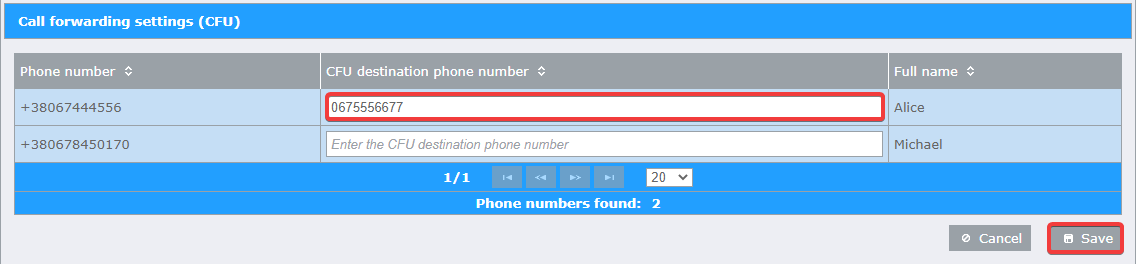
To set up unconditional call forwarding (CFU):
Open the “Forwarding setup” web portal at https://fmc.kyivstar.ua/cfu;
Complete the required changes:
Enable CFU - enter the phone number, which you want to set forwarding to, in the “CFU destination phone number” field;
Disable CFU - remove the phone number from the “CFU destination phone number” field (leave the field empty);
Change CFU - change the phone number in the “CFU destination phone number” field.
Save changes by clicking on the “Save” button at the bottom of the table.
Note
This service is only available for the phone numbers which are signed on “Converged” + “API FMC” service packages. The list of Kyivstar telephone numbers with the “API FMC” package can be seen in the “Extended Services” section of your “Virtual Mobile PBX” web portal at the address https://fmc.kyivstar.ua/provisioning.
Note
You can use both long (full) and short (internal) phone number format for forwarding. From the point of view of economy, forwarding within an organization is best done using short (internal) numbers.
Note
The “CFU destination phone number” field may not be available for some numbers, in case these numbers use service sets that are not compatible with the CFU service (IVR, MLHG, etc.).
Note
It is forbidden to use the standard forwarding function, which is enabled on the mobile phone, in order to avoid conflicts in the implementation of forwarding.