
Integrartion with Generic FMC API
Detailed functional description of Generic FMC API is located in the chapter API for developers: Extended functionality.
Detailed technical documentation in OpenAPI format is available at the link: https://fmc.kyivstar.ua/manual/openapi.html
Note
This service is only available for the phone numbers which are signed on “Converged” + “API FMC” service packages. The list of Kyivstar telephone numbers with the “API FMC” package can be seen in the “Extended Services” section of your “Virtual Mobile PBX” web portal at the ad>
Note
Phone call recording service is only provided for numbers for which the Call recording feature has been purchased.
Configuring Integration
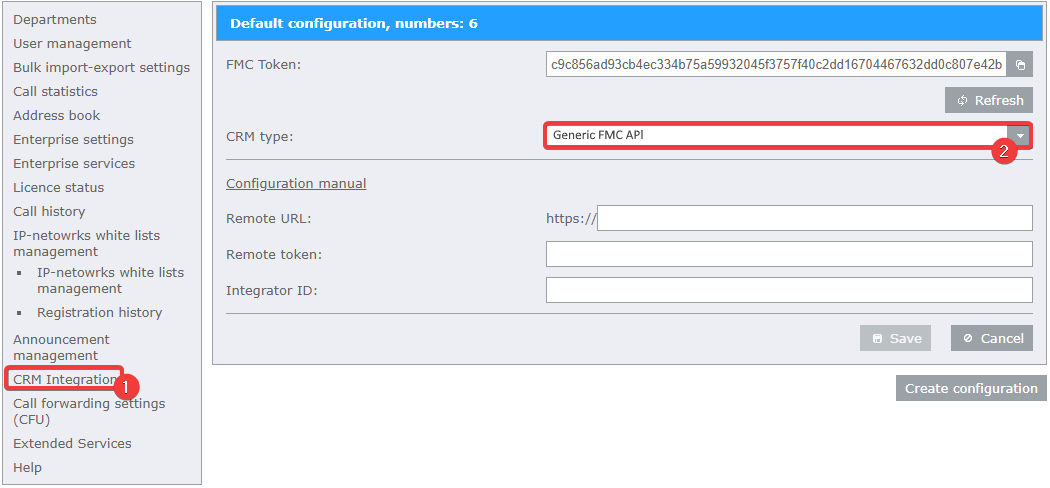
Open integration web-portal of your “Virtual Mobile PBX” at the address https://fmc.kyivstar.ua/crm-integration (use “Virtual Mobile PBX” enterprise administrator’s login and password) and go to the “CRM Integration” section.
Select “Generic FMC API” in the “CRM Type” drop-down menu.
In the “Remote URL” field, enter the your web-server’s URL, that will receive information about call states.
In the “Remote token” field, enter the authorization token of your system.
In the “Integrator ID”, enter the your Integrator’s code.
Note
If you are a developer and want to get your own integrator code, please write to your manager Kyivstar. In the letter, indicate the name and EDRPOU of the Company, contacts of the person responsible for the development and technical support of integration with Generic FMC API, as well as indicate the IP address or URLof your information system that is integrated with Kyivstar PBX.