
Announcements management
After connecting the call recording function to the “Virtual Mobile PBX” number, at the beginning of the telephone conversation, both interlocutors will hear the announcement. The announcement management feature allows you to control the recordings that will be played when recording telephone conversations.
Announcements configuring
Announcements in the “Virtual Mobile PBX” consist of 2 parts:
“System announcements” are pre-set announcements. Users cannot add new or delete existing ones.
“Custom announcements” are optional announcements that users can add and manage themselves. Custom announcements will be played before system announcements.
The announcement management page at https://fmc.kyivstar.ua/drs-announcement/ provides two blocks for configuring announcements, separately for incoming and outgoing calls.
To set up the announcement, in the “Incoming” or “Outgoing calls” block, open the drop-down list in the “System” or “Custom announcement” field, select the desired recording and save changes by clicking the “Save” button.
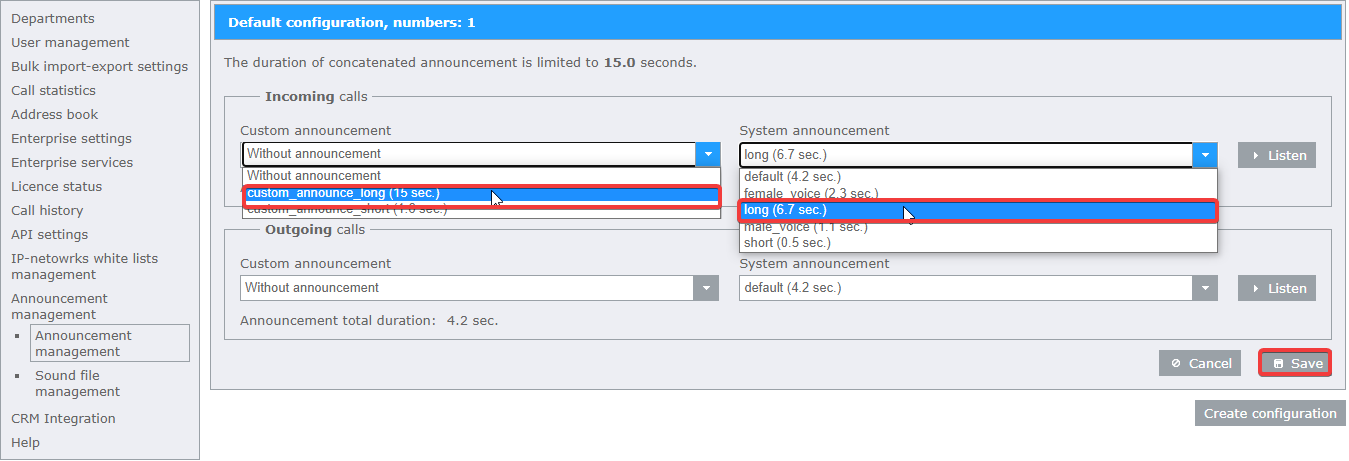
In order to listen to the announcement, as it will be played during a telephone conversation, you can click the “Listen” button.

Note
By default, the announcement management page may not contain any “Custom announcements”. A “Custom announcement” can be added using the “Custom announcement” management tool .
Note
You can configure different announcements for different phone numbers of the “Virtual Mobile PBX” using the Settings configurations tool.
Note
The duration of the “Custom announcement” cannot exceed 15 seconds. The total duration of “System” and “Custom announcement” also cannot exceed 15 seconds.
“Custom announcement” management
In oreder to upload a “Custom announcement”:
Go to the sound file management page at https://fmc.kyivstar.ua/drs-announcement/custom_announcements;
Click on the “Add announcement” button;
Select the desired MP3 or WAV file.
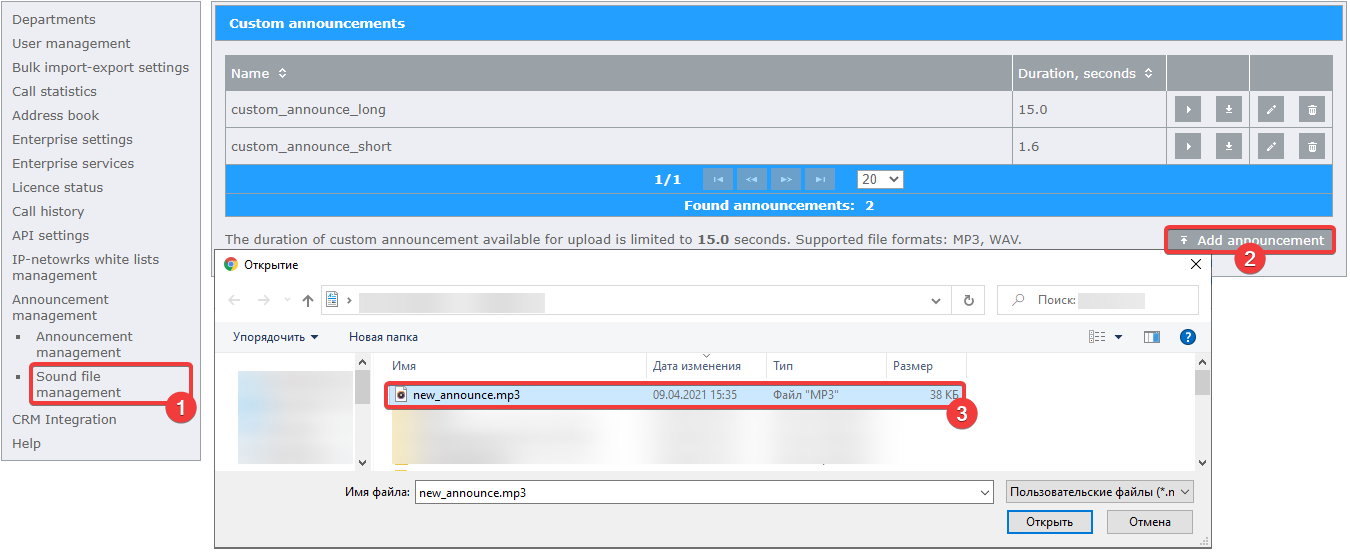
Unlike “System announcement”, you can manage “Custom announcement”
Management includes:
Ability to listen to the announcement by clicking on the “Play announcement audio” button;
Ability to download an announcement by clicking on the “Download announcement audio” button;
Ability to rename an announcement by clicking on the “Edit announcement name” button;
Ability to delete an announcement by clicking on the “Delete announcement” button.
