
“Virtual Mobile PBX” video tutorials
Multiline hunting group
The function “Multiline hunting group” gives possibility to improve telephone servicing of your clients. Due to automatic distribution of all incoming calls to your number, the number of missed calls and the time during which your customers are waiting on the line are minimized. See our video tutorial how to set up “Multiline hunting group”.
Note
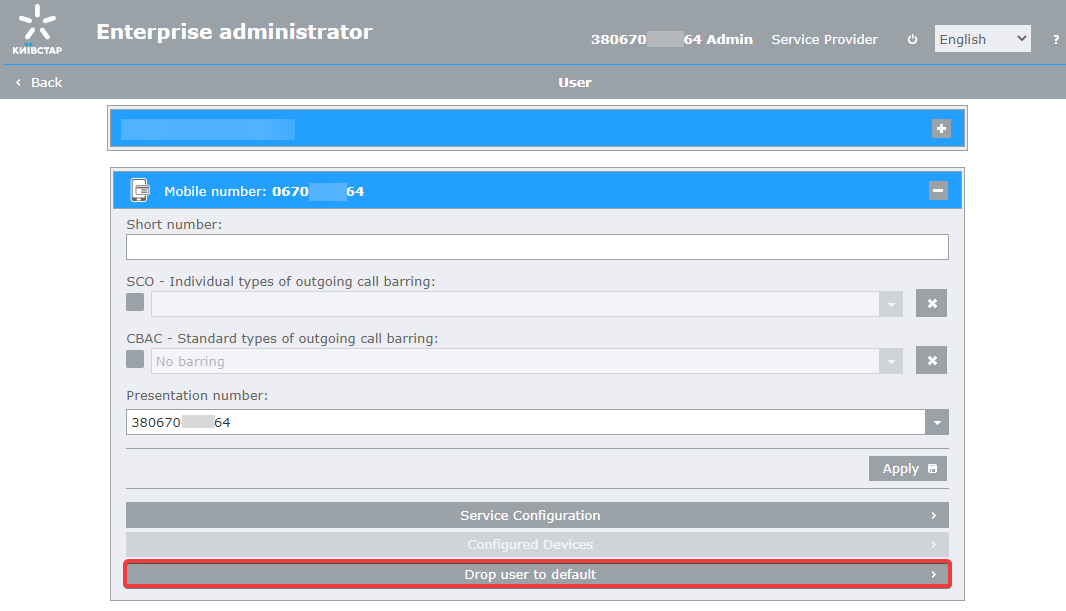
If a user has already been created on the number that needs to be made virtual, you must first reset all number settings to default.
To reset the number settings to default, on the page of your “Virtual Mobile PBX” enterprise go to the “User Management” page, click on the desired number from the “Phones”. In the number control window, click on the “Drop user to default” button.
Note
On a mobile number that is being created as a virtual number, you need to disable basic services: “Notify me”, “Notify about me”, “Who has Called”, and voice mail.
To do this, you need to insert the SIM card into the phone and perform the following operations:

Short numbers
Short numbering will allow you to simplify and optimize business processes in your company. These are numbers from several digits which are easy to remember and dial. See our video tutorial to get to know how to assign short numbers to your mobile and fixed phone numbers.
IVR
“Interactive voice menu (IVR)” function will help you to improve telephone servicing of your customers. By using it you will be able to ensure distribution of all incoming calls on you number, minimize quantity of missed call and provide customer useful information while they are waiting on line. All needed to set up the “Interactive voice menu (IVR)” see in our video.
Note
On a mobile number that is being created as a virtual number, you need to disable basic services: “Notify me”, “Notify about me”, “Who has Called”, and voice mail.
To do this, you need to insert the SIM card into the phone and perform the following operations:
Call pickup
With the function “Call Pickup” you and your colleagues will be able to intercept calls that come to your phone numbers. Helping each other you reduce the number of missed calls, and interaction with colleagues will rise to a new level. How to set up “Call Pickup” please see our video.
Black and White lists
The main need of the function “Black and White lists” is a protection of your telephone numbers from unwanted calls and telephone spams. You will be are able to prevent incoming call with certain numbers or subscribers of certain networks. Also you will be able to create a list of subscribers and receive only their call. Get know how to set up the “Black and White lists” from our video.
Outgoing call barring
Need to somewhat reduce the cost of communication? Learn from our video how to prohibit abroad calls and other expensive tariff directions about the setting “Outgoing call barring” function.
Parallel ringing
Do you have a fixed and mobile number? Use the “Parallel ringing” to simultaneously receive calls on two numbers and be always connected. There is a manual of setting of this function in our video.